Every paid search manager now has the same AI. You can install a coding agent this afternoon, point it at your Google Ads account, and have it pulling reports within the hour. So can your competitor down the street, and so can the agency pitching your client next week. Once everyone owns the same hardware, the hardware stops being the advantage.
That’s the premise behind an idea picking up steam in performance marketing: the PPC OS, or PPC operating system. The name comes from PPCOS, a product built by the team at PPC Mastery [1]. But the part worth your attention isn’t the product you can buy. It’s the framework underneath it, which any decent paid search specialist can study and rebuild for their own work.
Miles McNair, who co-founded PPC Mastery, summed it up in the workshop where his team opened the hood on their system: “Your edge is not the agent, because everyone has the agent. Your edge is the operating system you build to steer it.” [1]
So let’s break it down properly: what a PPC operating system actually is, why building your own beats leaning on Google’s built-in AI, what goes inside each layer, and the order you’d actually build one in. The architecture here is PPC Mastery’s and I link their work throughout, but the takeaway is that it’s a blueprint, not just a purchase.
Table of Contents
What is a Paid Search OS?
A coding agent like Claude Code is basically commodity hardware. Powerful, yes, but on its own it doesn’t know your clients, your standards, or what “good” looks like in your accounts. A PPC operating system is the software layer that turns that generic agent into a reliable Google Ads execution-and-strategy engine: the body of knowledge, instructions, and guardrails it loads before it touches a single campaign.
That’s where the durable value sits. Anyone can run the agent. Nobody can copy your codified way of working, your SOPs, your definition of an irrelevant search term, your client’s unit economics. And it compounds. Every decision you write down makes the next run a little sharper, and over time that knowledge base becomes a moat competitors can’t simply download [1].
Why build your own instead of using Google’s AI?
Google would rather you didn’t. At Google Marketing Live 2026 it launched Ask Advisor, a Gemini-powered agent that spans Google Ads, Analytics, and Merchant Center, with a shared memory layer that holds your goals as you move between tasks [6][7]. Ask it “why did performance drop?” and it answers; ask it to draft campaign changes and it will. For a lot of advertisers that’s genuinely handy, and I went through the full slate of announcements in my Google Marketing Live 2026 rundown.
Here’s the catch. Ask Advisor runs on Google’s operating system and Google’s incentives. Its advice has a habit of pointing toward whatever grows Google’s revenue: raise the budget, switch on AI Max. Which is about what you’d expect from an assistant built by the company that sells the ad inventory. Build your own PPC OS and you’re building your own Ask Advisor, except it runs on your definition of good. You decide why a ROAS target is too high or too low. You decide what counts as wasted spend. That control is the whole point [1].
The four layers of a PPC operating system
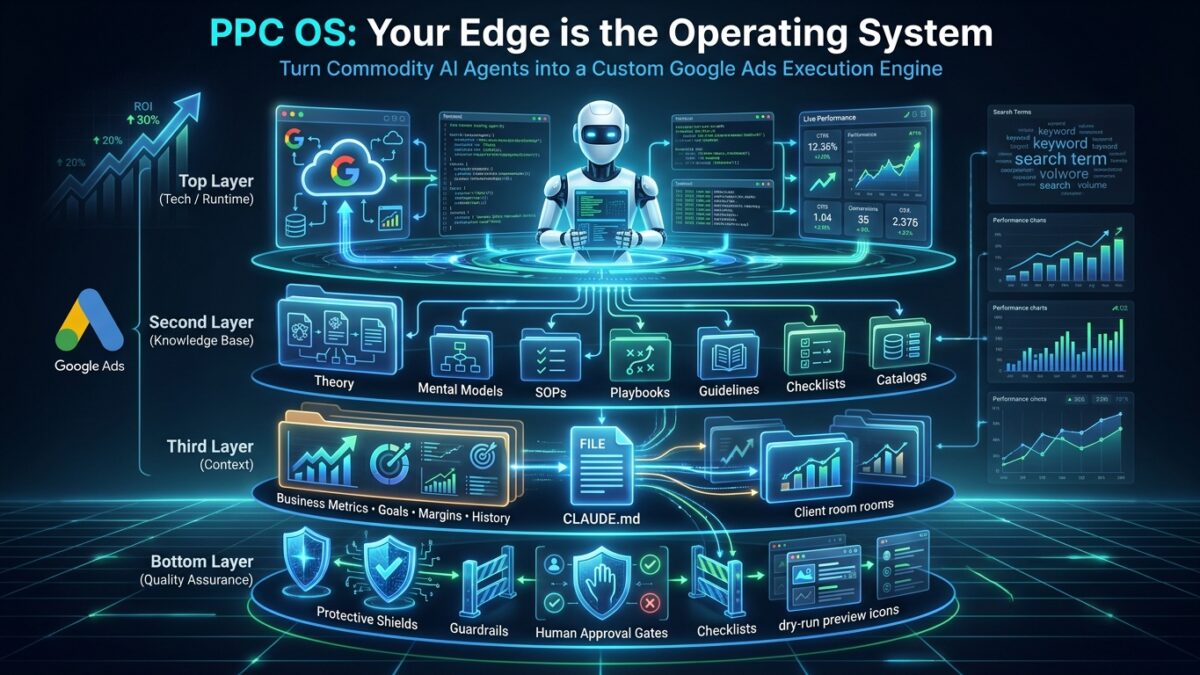
A working operating system needs all four of these layers. Drop one and the output degrades [1].
- Tech, the runtime. The coding agent itself, wired to live account data. PPC Mastery runs Claude Code, Anthropic’s terminal-based agent that reads your files, runs commands, and actually executes work instead of just chatting [3]. It reaches the Google Ads API, often through a Model Context Protocol (MCP) server, the open standard Anthropic introduced for connecting AI tools to data sources [5][8]. Entry cost is around $20 a month; heavy use runs $100 to $200.
- Operating system, the knowledge base. Your expertise, distilled into procedures and then translated into agent skills. This is the bulk of the work and where most of the months go.
- Context, your business reality. Goals, targets, margins, client history, constraints. As PPC Mastery’s AI architect put it: “If it’s only in your head, it doesn’t exist.” [1] Skills without context just make the agent guess.
- Quality assurance, the guardrails. Dry runs, defined queries, and human review that keep the agent from drifting or hallucinating. Both specialists profiled in the workshop run read-and-write setups, but nothing publishes without a human looking at it first [1].
The rest of this article lives in layers two and three. That’s where the building happens, and it’s what most write-ups skate past.
Building the knowledge base, bottom-up
The knowledge base is the heart of the thing. PPCOS holds roughly 257 documents across eight categories, and the structure isn’t arbitrary: it’s built from the foundation up, because each layer references the ones below it [1][2]. You write the theory first because the mental models lean on it, then the mental models because the SOPs lean on those, and so on. Here’s what goes in each category, with the kind of document you’d write for a paid search account.
- Theory — the frameworks the whole system reasons from. A Theory doc might lay out systems thinking, or the Theory of Constraints, in a page the agent consults when it’s deciding where to spend its effort. These barely change once written.
- Mental models — how to think through a recurring decision. “When to segment versus consolidate a Shopping campaign.” “The golden rules of search campaign structure.” “What the common failure modes look like in the data.” This is the judgment you apply without noticing, written down so the agent can apply it too.
- References — dry, factual specs that stop the agent getting details wrong: responsive search ad character limits, image dimensions and aspect ratios per campaign type, which GAQL fields exist on a given resource. Pure guardrail material, no opinions.
- Guidelines — your default configuration, with the reasoning attached so the agent knows when it’s safe to deviate. “Dynamic sitelinks off, dynamic callouts off, seller ratings on, long headlines on,” and the why behind each call [1].
- Catalogs — option libraries that give no recommendation at all. The Shopping-segmentation catalog, for instance, lists every way to slice a feed: by product category, by bestsellers, sale versus regular price, seasonality, inventory level, product lifecycle, price competitiveness, or the heroes / sidekicks / villains / zombies model. The catalog doesn’t choose. It just makes sure the agent knows all the options exist.
- Checklists — binary pass/fail gates. Did this campaign clear every box before launch? The agent runs the list and reports yes or no, no interpretation required.
- SOPs — the repeatable procedures, and the biggest category at 88 documents. The responsive-search-ad testing SOP, say, spells out its prerequisites before the loop even starts: fix the offer, the angles, the existing RSAs, and keyword relevance first, then run the iteration. An SOP that skips its prerequisites just automates a mistake faster.
- Playbooks — the top layer, and the frontier. A playbook is a routing skill: it watches for a signal, decides which skill should respond, and fires it. PPCOS has only two so far, which tells you how hard this orchestration layer is to get right.
The three categories people conflate are catalogs, mental models, and guidelines, and keeping them apart is what lets the agent reason instead of parrot. A catalog lists the options and stays silent. A mental model holds the reasoning for choosing between them. A guideline gives your default answer and the why. Mash them into one “best practices” file and the agent just applies whatever’s written, which is the generic behaviour you’re trying to escape. Keep them separate and it can weigh the catalog options against your mental model and the client’s context, then reach for a guideline only when one truly fits [1].
One Theory document is worth singling out. McNair calls bottleneck analysis “the mother of all skills,” and it’s really Eliyahu Goldratt’s Theory of Constraints applied to ads: every system has one binding constraint, and effort spent anywhere else barely moves the needle [9]. In paid search terms, if conversion rate is your bottleneck, then broadening match types or flipping on AI Max only pushes more traffic into a leaky funnel. Sometimes the constraint isn’t even in the account. A sudden drop might trace back to a supply-chain price spike, which is not something you’ll fix in Google Ads no matter how long you stare at the dashboard [1].
Anatomy of a single skill
A skill is what turns a procedure into something the agent runs the same way every single time. The gap between a human SOP and a working skill is bigger than it looks, and closing it is the real engineering [4].
Take search-term auditing. The human version is two lines: pull the search terms, scan for anything irrelevant, add the bad ones as negatives. You read that and you know exactly what to do, because you’re carrying years of context behind it. The agent carries none of that, so every implicit step has to be made explicit. Here’s what one skill actually contains:
- A defined query. The skill ships with one exact GAQL query so it pulls identical data on every run [1]. Let the agent write its own query and it’ll phrase it slightly differently each time, and now you’re comparing this week’s audit against last week’s across two subtly different datasets.
- A script to run it. Not a polite request to “go get the data,” but an actual script that hits the Google Ads API and returns the rows. Deterministic in, deterministic out.
- A condensing script. A real search-terms export can run to hundreds of thousands of rows, and you cannot hand that to a language model. So a script summarises it first, the biggest spenders, the highest-cost terms with no conversions, the long tail collapsed, and the agent reads the summary while the raw file stays on disk for when it needs to verify something [1].
- A business.md. “Irrelevant” means nothing without context. For a plumber, the word “course” is junk traffic; for a training company it’s the entire business. The skill points at a file that defines what irrelevant means for this specific client [1].
- An exact change method. “Add the negatives” has to say how: which script writes them, whether the output is a CSV for Google Ads Editor or a direct API push, and that it runs as a dry run you approve before anything goes live [1]. Leave that vague and the agent improvises a new method on every run; the day one of them misfires, you won’t be able to trace what it did.
Stack all that up and a single skill, the search-term auditor, comes out to nine files plus four other skills it leans on, plus the scripts [1]. One skill can eat days of building, testing, and debugging before you trust it with a live account. That’s the real cost, and nobody quotes it up front.
There’s a reason it takes that much. Every skill has to combine three layers of knowledge [1]:
- What the model already knows. General best practice from its training, like “don’t mix brand and non-brand keywords in one ad group.” You don’t have to teach this.
- How you specifically do the task. Your method for reviewing search terms, your way of writing an RSA. This is the skill itself.
- The client’s business context. Their margins, their targets, their no-go list. Without this third layer, the agent is just guessing with confidence.
Skip layer three and you get generic output dressed up as bespoke advice. That’s the single most common reason a home-built OS underwhelms.
Skills don’t work in isolation either. PPCOS sorts them into four types, gatherers, auditors, optimizers, and makers, that hand off to one another: a gatherer pulls the data, an auditor flags a problem, and the system already knows which optimizer should run next [10]. Writes are deliberately staged through a careful pipeline, reads first, then small changes, then larger ones, rather than letting the agent rewrite an account in one swing [10]. And Anthropic has since turned Agent Skills into an open standard, folders of instructions and scripts an agent loads only when they’re relevant [4], which makes this whole layer far more portable than it was a year ago.
Context engineering: the real bottleneck
Every large language model has two structural problems, and a usable PPC OS has to solve both. This is layer three, and it’s where most of the ongoing effort actually goes [1].
The first problem is statelessness. Every session starts from nothing; the model has no memory of yesterday. The fix is a folder structure that works as memory, and the office analogy is the clearest way to picture it. The hub folder is the agency itself. Inside it, every client gets their own room, a folder holding their context, their account history, and a running change log. The agent writes back to those files as it works, so the memory thickens over time: this month’s audit can see what last month changed and why it changed. And because the rooms are sealed off from each other, nothing from one client bleeds into another client’s recommendations [1].
Each folder also carries a CLAUDE.md, a file the agent loads at the very start of every session. Think of it as the system prompt plus a map. It doesn’t hold the knowledge itself; it labels where the knowledge lives, client context here, Google data there, brand guidelines over there, and sets the house rules. The workshop’s analogy is the one that sticks: without a CLAUDE.md, the agent is an intern who opens every door in the building looking for one stapler; with it, the doors are labelled and it walks straight to the right one [1]. That’s the difference between an agent that burns its whole context window wandering around and one that stays sharp on the task.
The second problem is the context window. The advertised limit might be a million tokens, but answer quality falls off well before that. You cannot drop 200 documents and a 500,000-row search-term export on the model and expect anything coherent back; it reads the first chunk and hallucinates the rest. The fixes are the condensing scripts from earlier, which boil large datasets down before the agent ever sees them, and the defined per-skill queries that keep each data pull tight and identical [1].
This is also where the romance of “audit your account in 90 seconds” falls apart. The slash command is fast. The work isn’t. When PPC Mastery demonstrated a “fast” audit, most of the time went into gathering context, building a long client questionnaire, feeding the answers back, letting the system flag contradictions, and that’s the part you can’t automate away [1]. Context engineering is never fully finished; it’s the thing you’re always topping up.
How to build one, step by step
You don’t assemble all of this at once, and you shouldn’t try. Here’s a realistic order to go from nothing to a working, if small, paid search operating system.
- Pick your runtime and keep it cheap. Start with Claude Code on the entry plan, running inside Cursor, where the plugin is free [3]. Don’t pour money or weeks into tooling before you’ve proven the workflow on a single account.
- Connect your data, read-only. Wire the agent to the Google Ads API, ideally through an MCP server so you can ask for data in plain language and let it generate the query underneath [5][8]. Start strictly read-only. The agent can pull and analyse but cannot change anything, and you want weeks of watching it reason before it ever touches a live campaign.
- Build the folder structure. One hub folder, one client folder inside it. In the client folder, write down what you already know: their goals, their margins, their no-go list, the recent history. This is layer three, the layer most people skip, which is exactly why their agent hands back generic advice [1].
- Write your first CLAUDE.md. Keep it short. Tell the agent where each file lives, what this client sells, what “good” means in this account, and the one rule it can never break: never publish without your approval. You’ll grow the file as you go [1].
- Encode one skill, end to end. Pick the highest-frequency annoying task; search-term auditing is the usual first choice. Write the defined query, the script that runs it, the condensing script, and the business.md that says what irrelevant means here. Set the change method to a dry-run CSV you review by hand. That’s one complete skill, and it’ll take longer than you expect. That’s normal [1].
- Run it read-only and review everything. Trigger the skill, read what it produces, and compare it against what you’d have done yourself. Where it’s wrong, the fix is rarely the model; it’s a missing piece of context or an under-specified step. Patch the skill, run it again. This loop is the actual work [1].
- Add a checklist and guardrails. Before you ever let a skill write to the account, wrap it in a checklist, did it respect the no-go list, is the change reversible, and keep the dry-run gate in front of it. This is the QA layer, and it’s what stands between you and an agent confidently torching a campaign [1].
- Build the next skill, then a playbook. Once you’ve got three or four skills, write a thin playbook that routes between them: if the auditor flags wasted spend, run the negative-keyword maker next [10]. This orchestration layer is the hardest and most valuable, and the one even PPCOS has barely started on, so don’t be discouraged that it’s slow.
Notice what’s missing from that list: “let it run unattended.” Both specialists who’ve actually scaled this keep a human reviewing every change [1]. The operating system makes you faster. It doesn’t make you absent.
Build from scratch, or fork an existing OS?
Two honest paths here. Building from scratch gives you total control and costs hundreds of hours; PPC Mastery’s own system took months and, by their own admission, is “still halfway there.” Or you plug into an existing operating system like PPCOS, fork it, poke around under the hood, and swap in your own procedures [2][11]. Even then you still have to supply layer three, your client context, and you should build at least a few of your own skills. Nobody else can explain how you write a responsive search ad.
One security note worth repeating: downloadable skills can be laced with malicious code to lift your API keys. Vet whatever you install [1].
What it actually unlocks
None of this is theoretical. The workshop profiled two specialists running opposite models off the same foundation [1]:
- The volume play. One founder runs 40-plus ecommerce accounts with a two-person team and a custom agent he treats like a real employee, login and all. A diagnostic routine sweeps every account daily and surfaces the day’s priorities. He reckons he’s clawed back 60 to 80% of his day, which goes straight into winning new clients.
- The depth play. Another handles around 50 mostly lead-gen clients and took reporting from five days down to roughly two hours, running several tasks at once. He kept his prices flat and delivers more per retainer instead, betting on retention.
Three things they share: human review before anything goes live, retainer pricing rather than hourly (which stops making sense the moment AI collapses your time-to-deliver), and no illusion that the AI is doing the thinking. “A fool with a tool is still a fool,” as McNair likes to say. Or, from one of the practitioners: “AI-first by itself doesn’t make sense, it’s always AI-first something.” You have to be the expert first.
Your edge is the operating system
If one thing sticks, make it this. The agent is a commodity. The operating system you build around it, your procedures, your context, your guardrails, your definition of good, is what compounds and what nobody can copy.
You don’t have to write all 257 documents this month. Start small. Open one client folder, write one CLAUDE.md, turn one SOP into one skill, and run it read-only until you trust it. Keep yourself in the loop. Then add the next skill. The teams pulling ahead in search engine advertising right now aren’t the ones with the smartest model, because everyone has the same model. They’re the ones who started building the operating system around it first.
Sources
[1] How to Win in the Agentic Era (workshop) — PPC Mastery. https://www.youtube.com/watch?v=DlKh7AJh6p4
[2] PPC OS Knowledge Base — PPC Mastery. https://os.ppcmastery.com/
[3] Claude Code — Anthropic. https://www.anthropic.com/product/claude-code
[4] Equipping agents for the real world with Agent Skills — Anthropic. https://www.anthropic.com/engineering/equipping-agents-for-the-real-world-with-agent-skills
[5] Introducing the Model Context Protocol — Anthropic. https://www.anthropic.com/news/model-context-protocol
[6] Google launches Ask Advisor across Ads, Analytics and Merchant Center — Search Engine Land. https://searchengineland.com/google-launches-ask-advisor-across-ads-analytics-and-merchant-center-478114
[7] Ask Advisor — Google. https://business.google.com/us/accelerate/announcements/ask-advisor/
[8] What is the Model Context Protocol (MCP)? — modelcontextprotocol.io. https://modelcontextprotocol.io/docs/getting-started/intro
[9] Theory of Constraints — Theory of Constraints Institute. https://www.tocinstitute.org/theory-of-constraints.html
[10] PPCOS: An AI Operating System for Google Ads — Pitcocy. https://pitcocy.com/projects/ppcos-ai-agent-challenge
[11] The PPC Hub — PPC Mastery. https://www.ppcmastery.com/hub